Scene class, which holds everything. More...
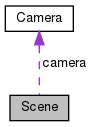
Public Member Functions | |
| Scene (int width=640, int height=480, const char *name="AGL") | |
| Create a scene. More... | |
| ~Scene () | |
| void | setPerspectiveProjection (float fovDeg=45, float aspectRatio=-1, float near=0.1, float far=100) |
| Set a perspective projection matrix. More... | |
| void | setOrthographicProjection (float left=-1, float right=1, float bottom=-1, float top=1, float near=0.1, float far=100) |
| Set a orthographic projection matrix. More... | |
| void | setCamera (const glm::vec3 &pos, const glm::vec3 &lookAt, const glm::vec3 &up) |
| Set a new camera for the scene. More... | |
| void | setProjection (glm::mat4 &mat) |
| Set the projection matrix. More... | |
| void | setView (glm::mat4 &mat) |
| Set the view matrix (in the camera). More... | |
| void | setController (GLFWkeyfun keyCallback=nullptr, GLFWcursorposfun cursorPosCallback=nullptr, GLFWmousebuttonfun mouseButtonCallback=nullptr, GLFWscrollfun scrollCallback=nullptr, GLFWwindowsizefun windowSizeCallback=nullptr) |
| Set controllers for the scene. More... | |
| void | setBGcolor (float r=0, float g=0, float b=0, float a=0) |
| Set the background color. More... | |
| void | add (BaseEntity &e) |
| Add an Entity or Light to the scene. More... | |
| void | enableLights (bool enable=true) |
| Enable lighting calculations. More... | |
| void | prepare () |
| Prepare the scene before rendering. More... | |
| bool | render () |
| Render the scene. More... | |
| glm::mat4 | getMatVP () |
| Get the view-projection matrix. More... | |
Public Attributes | |
| int | width |
| Width of the window. More... | |
| int | height |
| Height of the window. More... | |
| glm::mat4 | projection |
| Projection matrix for the render. More... | |
| Camera | camera |
| Camera for the scene. More... | |
| std::vector< BaseEntity * > | children |
| Stores all the Entity and Light. More... | |
| GLFWwindow * | window |
| The GLFW window for displaying everything. More... | |
| std::vector< Entity * > | entities |
| Temporary store all the Entity before render. More... | |
| std::vector< Light * > | lights |
| Temporary store all the Light before render. More... | |
Detailed Description
Scene class, which holds everything.
The Scene class holds the camera, all the entities that need to be displayed, the lights and much more. The Scene creates a GLFW window to display the rendered contents. The Scene can be controlled with user inputs (default controls inbuilt). This class also contains the projection matrix, the P part of the MVP matrix.
Constructor & Destructor Documentation
◆ Scene()
| Scene | ( | int | width = 640, |
| int | height = 480, |
||
| const char * | name = "AGL" |
||
| ) |
Create a scene.
- Parameters
-
width Width of the window. height Height of the window. name Name for the window.
This will create a scene, create a GLFW window, create a default perspective projection matrix and set some default controllers. Although you can create as many scenes as you like, only one scene can be displayed at any time currently.
◆ ~Scene()
| ~Scene | ( | ) |
Member Function Documentation
◆ add()
| void add | ( | BaseEntity & | e | ) |
◆ enableLights()
| void enableLights | ( | bool | enable = true | ) |
Enable lighting calculations.
- Parameters
-
enable Enable?
This enables (or disables) lights for the scene. This just sets the Material::lightsEnabled for all the Entity. The shader for the Entity actually decides if lights should be used or not.
◆ getMatVP()
| glm::mat4 getMatVP | ( | ) |
Get the view-projection matrix.
- Returns
- The VP part of the MVP matrix.
◆ prepare()
| void prepare | ( | ) |
◆ render()
| bool render | ( | ) |
Render the scene.
- Returns
- Returns
false, if the window should close,trueotherwise.
This method actually renders everything on the window. This loads the required buffers and shaders, sets the parameters, etc. This method must be called each time in the rendering loop to update the scene, say for animations. The return value of this method can be used as the condition for the render loop.
◆ setBGcolor()
| void setBGcolor | ( | float | r = 0, |
| float | g = 0, |
||
| float | b = 0, |
||
| float | a = 0 |
||
| ) |
Set the background color.
- Parameters
-
r Red. g Green. b Blue. a Alpha.
◆ setCamera()
| void setCamera | ( | const glm::vec3 & | pos, |
| const glm::vec3 & | lookAt, | ||
| const glm::vec3 & | up | ||
| ) |
Set a new camera for the scene.
- Parameters
-
pos The position of the camera. lookAt The point the camera looks at. up The up vector for the camera.
◆ setController()
| void setController | ( | GLFWkeyfun | keyCallback = nullptr, |
| GLFWcursorposfun | cursorPosCallback = nullptr, |
||
| GLFWmousebuttonfun | mouseButtonCallback = nullptr, |
||
| GLFWscrollfun | scrollCallback = nullptr, |
||
| GLFWwindowsizefun | windowSizeCallback = nullptr |
||
| ) |
Set controllers for the scene.
- Parameters
-
keyCallback Called on key press. cursorPosCallback Called if the cursor is moved. mouseButtonCallback Called if the mouse button is clicked. scrollCallback Called if scrolled. windowSizeCallback Called if the window is resized.
This is used to set several callbacks for the scene. Several callbacks are already set when the scene is created. This can be used to add more controls for the user. If any of the parameter is null, the old value, if one was there, is retained.
- See also
- defKeyCB defScrollCB defWindowSizeCB
◆ setOrthographicProjection()
| void setOrthographicProjection | ( | float | left = -1, |
| float | right = 1, |
||
| float | bottom = -1, |
||
| float | top = 1, |
||
| float | near = 0.1, |
||
| float | far = 100 |
||
| ) |
Set a orthographic projection matrix.
- Parameters
-
left Left for render, this is the point aligned with the left side of the window. right Right for render, this is the point aligned with the right side of the window. bottom Bottom for render, this is the point aligned with the bottom of the window. top Top for render, this is the point aligned with the top of the window. near Near for render, anything nearer to this will be clipped. far Far for render, anything beyond this will be clipped.
◆ setPerspectiveProjection()
| void setPerspectiveProjection | ( | float | fovDeg = 45, |
| float | aspectRatio = -1, |
||
| float | near = 0.1, |
||
| float | far = 100 |
||
| ) |
Set a perspective projection matrix.
- Parameters
-
fovDeg Field of view for render. aspectRatio Aspect ratio for render. If negative, automatically sets depending on the size of the window. near Near for render, anything nearer to this will be clipped. far Far for render, anything beyond this will be clipped.
◆ setProjection()
| void setProjection | ( | glm::mat4 & | mat | ) |
Set the projection matrix.
- Parameters
-
mat The matrix to set.
◆ setView()
| void setView | ( | glm::mat4 & | mat | ) |
Set the view matrix (in the camera).
- Parameters
-
mat The matrix to set.
Member Data Documentation
◆ camera
◆ children
| std::vector<BaseEntity*> children |
◆ entities
◆ height
| int height |
Height of the window.
◆ lights
◆ projection
| glm::mat4 projection |
Projection matrix for the render.
◆ width
| int width |
Width of the window.
◆ window
| GLFWwindow* window |
The GLFW window for displaying everything.
The documentation for this class was generated from the following files: